
Why iPhone Duo Is the Ideal Legal AI File Note Device for Solo Lawyers
See how the foldable iPhone Duo combines pocketable client-meeting recording with an iPad-like workspace for LexVoda draft File Notes.

The foldable iPhone Duo is an unusually strong fit for solo and small-firm lawyers using LexVoda: folded, it serves as a pocketable iPhone for recording a client meeting or post-meeting dictation; unfolded, it provides a larger, iPad-like workspace for generating, reviewing, and editing an AI-drafted File Note.
That combination addresses a familiar small-practice constraint. A lawyer may need one device to travel, communicate, record, process audio, and finish the matter record—without carrying a separate tablet between every meeting.
Product-status note: Apple officially announced the foldable iPhone Duo on September 9, 2026, with retail availability beginning October 23, 2026. Official announcements and detailed technical specifications can be reviewed on the Apple iPhone Newsroom. LexVoda is engineered to support iPhone Duo from day one, with final release validation completed across retail hardware and iOS 27.
Why iPhone Duo suits solo and small-firm lawyers
Solo and small-firm lawyers often move directly between client work and practice administration. There may be no separate person available to record every attendance, prepare every first draft, or transfer notes between devices. The most useful technology is therefore not always the largest device or the smallest device. It is the one that can adapt to the task at hand.
A book-style foldable iPhone offers two practical modes:
- Folded: a compact device for calls, client meetings, courthouse visits, travel, and quick post-meeting dictation.
- Unfolded: a larger workspace for reading a transcript, reviewing an AI-generated draft File Note, correcting details, and deciding what belongs in the matter record.
That is the appeal of the “best of iPhone and iPad” idea. It is not that a foldable device replaces every laptop or tablet workflow. It is that one device moves naturally from capturing legal audio to reviewing the structured work created from it.
Fold iPhone Duo to record the client meeting
In its folded form, the iPhone Duo remains close to a familiar phone workflow. A lawyer can place it on a desk, start a LexVoda recording, and keep the device compact and unobtrusive during the attendance, as shown in the concept image above.
The recording stage should remain deliberate. Before recording another person, the lawyer is responsible for determining whether notice, consent, authorization, or another safeguard is required by applicable law, professional obligations, firm policy, or the circumstances of the meeting. The availability of a recording feature does not make a particular recording lawful or appropriate.
Where recording the meeting is not suitable, the same folded-device mode supports a lawyer’s own dictation immediately afterward. The lawyer can capture the participants, material facts, client instructions, advice or decisions, and next steps while the context is still fresh. Read more about dictating a legal File Note after a client meeting.
Unfold iPhone Duo to generate the AI draft File Note
After the meeting, the value of a foldable device changes. Opening the 7.6-inch inner display provides room for LexVoda to show the matter, source audio, transcript, and AI-generated draft File Note without forcing the lawyer to move immediately to another device.
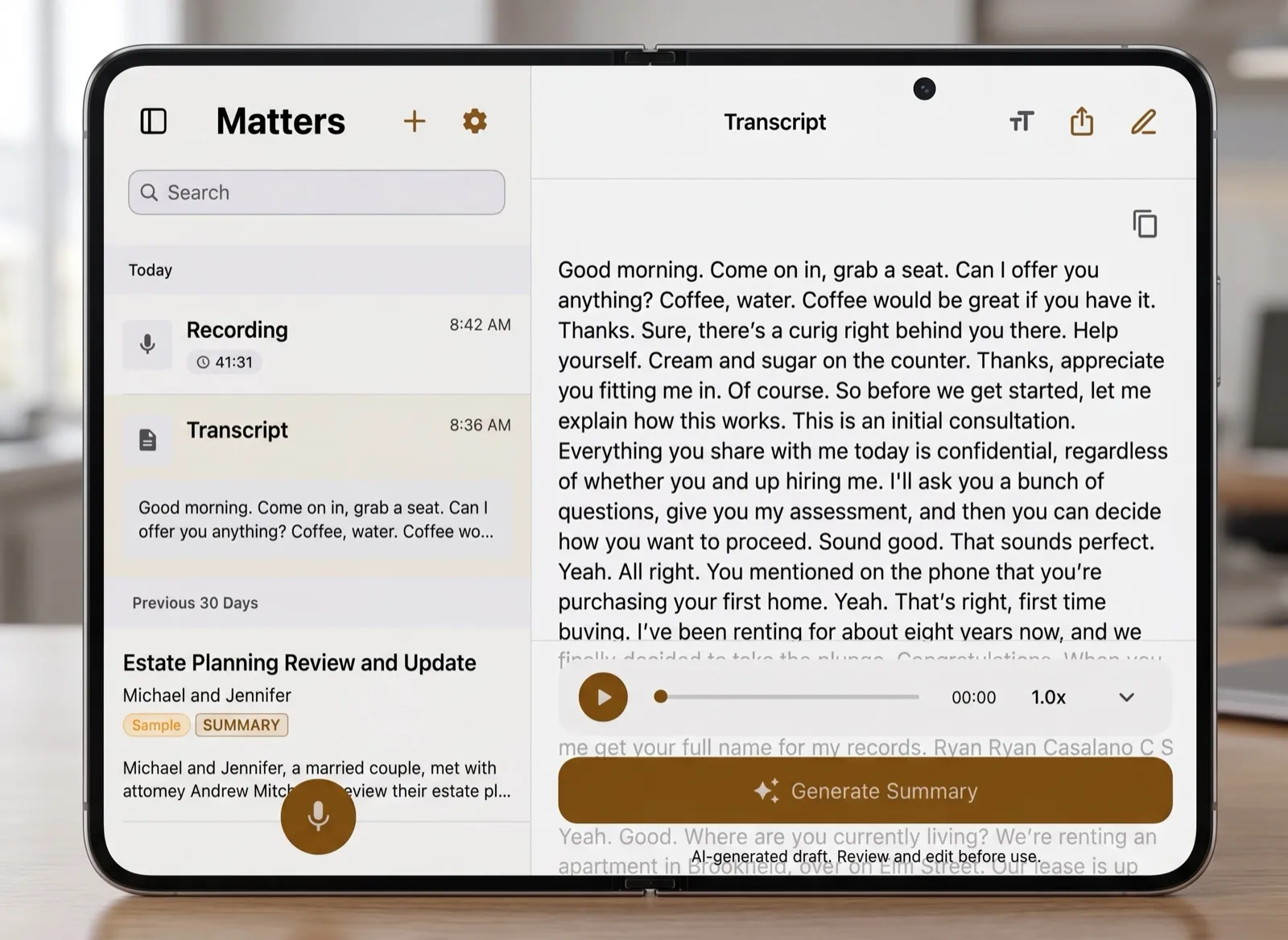
LexVoda’s core workflow processes transcription and AI-assisted File Note drafting on the supported Apple device. It turns recorded or imported audio into a supporting transcript and structured draft for lawyer review. The draft is not final legal work product, and the larger display does not change that responsibility.
The benefit of the unfolded form is practical visibility. More screen space makes it easier to:
- read longer sections of a draft without constant scrolling;
- compare the draft with the transcript or source context;
- identify names, dates, amounts, instructions, and action items;
- move between matter information and the File Note; and
- assess the overall structure before editing individual sentences.
LexVoda already uses an adaptive interface designed to respond to the available app-window size rather than assuming one fixed canvas. The app works across compact iPhone layouts, larger iPad layouts, and different LexVoda window sizes on supported MacBook devices. That same architecture is well suited to moving between the compact outer display and expanded inner display of iPhone Duo.
Use the unfolded screen to review and edit
The review stage is where an iPad-like inner display matters most. A File Note is easier to inspect when the lawyer can see more of its structure at once, especially after a detailed initial consultation, estate-planning meeting, client interview, or matter update.

The lawyer still needs to verify the draft against the source material, correct transcription or speaker errors, add missing context, remove irrelevant content, and decide whether the final edited note is appropriate for the matter.
An unfolded screen makes those tasks more comfortable, but it cannot perform the professional judgment behind them. The lawyer remains responsible for the accuracy, context, and final use of the File Note.
One device across the full LexVoda workflow
The conceptual workflow can be summarized in three stages:
| Device mode | Legal task | LexVoda role |
|---|---|---|
| Folded | Record a meeting or dictate notes afterward | Capture or import the source audio |
| Unfolded | Process and inspect the matter | Create a supporting transcript and structured draft File Note on-device |
| Unfolded | Review and complete the record | Provide editing and export tools while the lawyer verifies and approves the work |
For a solo lawyer, reducing handoffs between phone, tablet, recorder, and computer matters. A single adaptable device keeps the source audio, transcript, draft, and review workflow together when the lawyer is working away from the office.
The American Bar Association has separately discussed how mobile AI tools can help solo and small-firm lawyers work outside the traditional office while emphasizing efficiency, confidentiality, and professional responsibility. See How AI Will Change the Way Small-Firm Lawyers Work Outside the Office.
Why on-device AI matters in a foldable workflow
A larger display improves how a lawyer interacts with the draft, but LexVoda’s central product decision concerns where the AI work happens. Its core transcription and AI-assisted File Note drafting workflow runs on the supported Apple device rather than depending on a LexVoda-operated cloud AI inference service.
For a mobile lawyer, that means the recording, transcript, and draft can remain part of one local workflow before the lawyer decides whether to export or share anything. Internet access and third-party services may still be involved in app distribution, purchases, backups, synchronization, email, support, sharing, and other surrounding activities.
Based on confirmed specifications, LexVoda’s on-device architecture and adaptive interface are well matched to iPhone Duo. LexVoda supports the device, with hands-on testing on retail units verifying real-world recording acoustics, layout adaptation, and sustained AI performance. See the current LexVoda product overview.
Why iPhone Duo’s hardware is perfect for on-device legal AI
With Apple officially introducing the foldable iPhone under the “iPhone Duo” name, its confirmed hardware architecture demonstrates that it is exceptionally engineered for local, private artificial intelligence. For official announcements and full technical details, refer to the Apple iPhone Newsroom.
Running sophisticated speech recognition and legal synthesis models on a mobile device requires serious silicon and substantial memory bandwidth. The confirmed specifications of iPhone Duo make it an ideal hardware platform for LexVoda’s 100% on-device legal workflows:
| Component | iPhone Duo specification | Legal AI workflow advantage |
|---|---|---|
| Processor (SoC) | Apple A20 Pro (2nm process, 6-core CPU: 2 performance + 4 efficiency cores) | Sustained thermal efficiency and high single-core performance during lengthy audio recordings and continuous transcript processing. |
| GPU & AI Engine | 7-core GPU with next-generation Neural Engine and Metal acceleration | Hardware-accelerated matrix multiplication via mlx-swift, driving ultra-fast speech-to-text inference and prompt processing. |
| Unified Memory (RAM) | 12 GB unified high-bandwidth RAM | Generous memory headroom allowing state-of-the-art ASR models (like Qwen3.5 ASR) and edge language models to reside directly in memory without model-swapping latency. |
| Inner Display | 7.6-inch foldable Super Retina XDR OLED (with nano-texture option) | iPad-class workspace that enables simultaneous matter navigation, full transcript reading, audio waveform scrubbing, and structured File Note editing. |
| Cover Display | 5.4-inch OLED display | Discreet, pocketable form factor for one-handed client meeting recording, courtroom attendance notes, or quick post-consultation dictation. |
| Chassis & Power | Grade 5 titanium frame and dual-battery architecture | Durable pocket carry and extended battery endurance capable of powering continuous audio capture and intensive local AI synthesis. |
Perfect for legal transcription and draft File Note generation
This hardware profile directly addresses the two compute-heavy stages of LexVoda’s workflow:
- High-Accuracy Local Speech Transcription: Transcribing a 45-minute client consultation without cloud offloading demands sustained acoustic processing. The A20 Pro chip and 12 GB unified memory ensure that advanced speech recognition models (such as Qwen3.5 ASR) execute locally with minimal latency, high multi-speaker accuracy, and complete confidentiality.
- Instant Structured File Note Drafting: Once audio is captured, an edge language model must analyze the transcript to identify key instructions, dates, liabilities, and action items. With 12 GB of unified RAM, the LLM weights and context window fit entirely in local memory, generating structured draft File Notes in seconds without transmitting sensitive client disclosures across the internet.
- Adaptive Two-Screen Workflow: The combination of a 5.4-inch outer screen for capturing audio and an expansive 7.6-inch inner canvas for inspecting and editing the drafted output eliminates the need to carry both an iPhone and an iPad between meetings.
Hands-on testing on retail units will finalize exact battery benchmarks, acoustic isolation in varied meeting rooms, and split-screen multitasking profiles under iOS 27. However, the foundational hardware confirms that iPhone Duo delivers the exact compute density and memory capacity required for professional on-device legal AI.
Frequently asked questions
Has Apple officially announced iPhone Duo?
Yes. Apple officially announced the foldable iPhone Duo on September 9, 2026, with retail availability beginning October 23, 2026. The device features an Apple A20 Pro chip (2nm), 12 GB of unified RAM, an exterior 5.4-inch OLED cover display, and a foldable 7.6-inch Super Retina XDR inner display.
Will LexVoda support iPhone Duo?
Yes. LexVoda is engineered to support iPhone Duo from day one. Its on-device architecture is designed for the Apple A20 Pro and 12 GB unified RAM, and LexVoda’s adaptive UI seamlessly scales across both the compact outer display and the expanded inner screen.
Why is iPhone Duo useful for lawyers?
The folded 5.4-inch form is convenient for pocketable meeting recording or post-meeting dictation, while the unfolded 7.6-inch inner display provides an expansive workspace to review transcripts and edit structured draft File Notes without needing to switch between an iPhone and an iPad during a mobile workday.
Does a larger screen make an AI-generated File Note final?
No. LexVoda creates an AI-generated draft. The lawyer must review the source material, verify important details, correct errors, add context, and decide whether the final edited File Note is suitable for the matter.
Would the core LexVoda workflow require cloud AI?
LexVoda’s core transcription and AI-assisted File Note drafting features run on a supported Apple device rather than sending that matter content to a LexVoda-operated cloud AI service. Exports, sharing, email, support, backups, synchronization, and other third-party services can still cause information to leave the device.
A new standard for mobile legal work
With Apple’s release of the foldable iPhone Duo, the form factor is exceptionally well matched to LexVoda: fold it to capture a client meeting or dictation, then unfold it to generate, review, and edit the draft File Note.
That gives a solo or small-firm lawyer a pocketable recording device and a larger legal-work surface in one product—the convenience of an iPhone combined with the working space of an iPad. As the iPhone Duo arrives in lawyers’ hands, it delivers a genuinely adaptable mobile legal experience.
Explore the LexVoda workflow, read about what a legal File Note should include, or learn more about LexVoda.