

Can LexVoda Work with My Existing Legal Apps? Interoperability, Export Formats, and Workflows
Learn how LexVoda integrates with legal practice management software and legal AI platforms like Clio, Harvey, Smokeball, and LEAP using RTF, PDF, TXT, and M4A exports.

Yes, LexVoda works alongside your existing legal practice management systems (LPMS), document management platforms (DMS), and enterprise legal AI tools.
Rather than forcing law firms into another proprietary walled garden, LexVoda is designed as a specialized, on-device capture and drafting layer for lawyer-client conversations and post-meeting dictations. It produces open, universal file formats—RTF, PDF, TXT, and M4A—that you can immediately import, attach, or paste into systems like Clio, Harvey AI, Smokeball, LEAP, MyCase, and NetDocuments.
By generating standard file formats on your local Apple device, LexVoda gives lawyers complete control over where their data goes and how it is filed into the firm’s core systems.
The capture and export foundation
A typical lawyer-client meeting generates critical conversational data: factual background, client instructions, legal advice, agreed fee structures, and immediate action items.
LexVoda captures this interaction either through in-person recording or post-meeting lawyer dictation, runs transcription and AI drafting entirely on-device, and allows you to export:
- The Legal File Note – a structured, contemporaneous matter record organizing facts, instructions, advice, and next steps.
- The Supporting Transcript – a reference text of the recorded conversation to assist with verification.
- The Original Audio Recording – a high-fidelity
.m4aaudio file preserving the spoken record.
Each of these outputs can be exported in specific file formats tailored to different stages of your legal workflow.
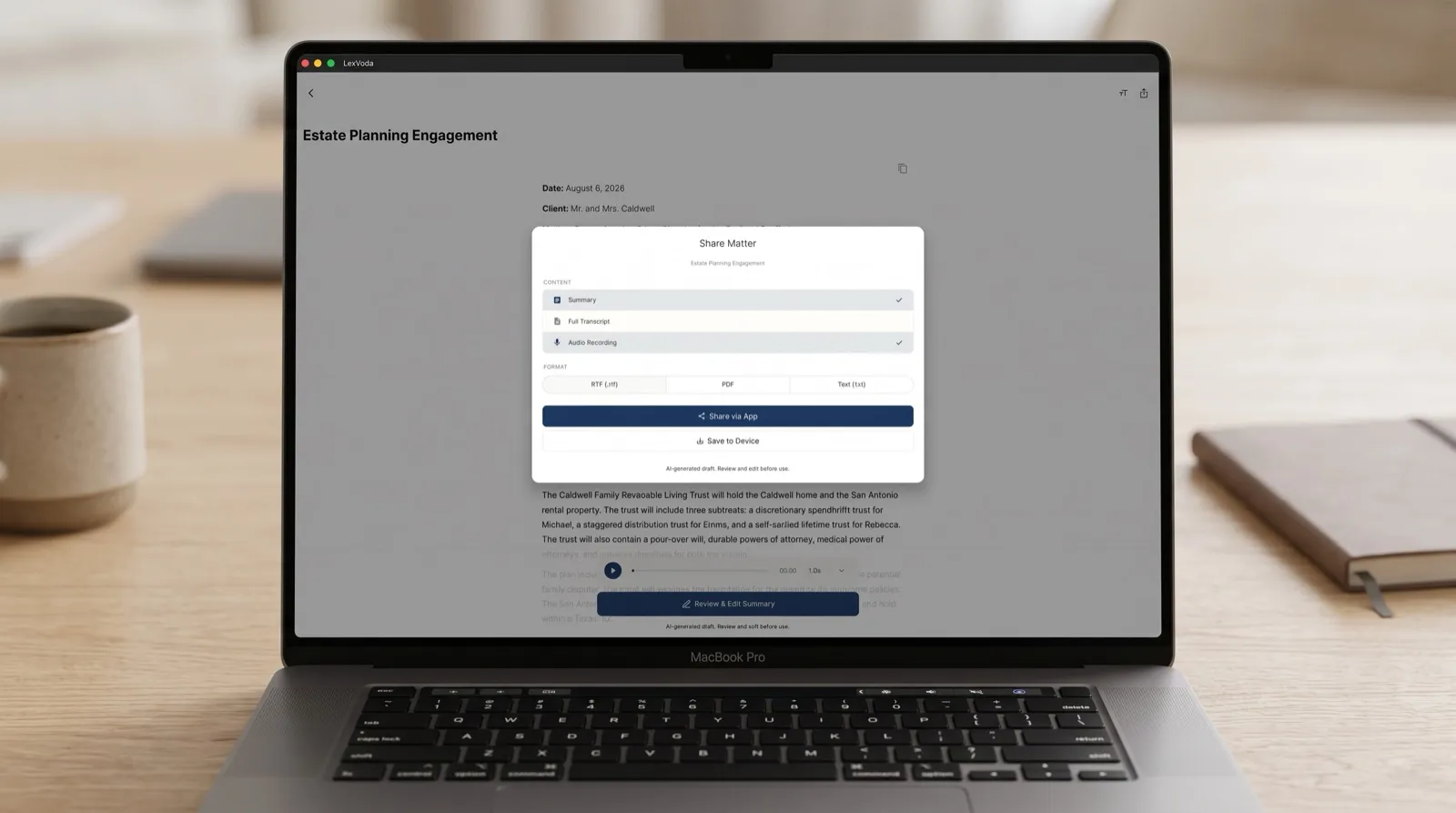
Why export formats matter: RTF, PDF, TXT, and M4A
Not every document in a law firm serves the same purpose. A draft File Note requiring further polish needs an editable format, whereas a permanent matter archive requires a tamper-evident, standardized document. LexVoda supports four distinct export formats to fit every operational requirement.
1. RTF (Rich Text Format): Formatted, editable working documents
Rich Text Format (.rtf) is an open document standard that preserves formatting—such as bold headings, bulleted action items, metadata headers, and structured tables—while remaining completely editable across word processors.
- Primary Purpose: Working drafts that require customization or expansion.
- Why it matters: Unlike plain text, RTF maintains the visual hierarchy created during the AI drafting stage. When you open an RTF file in Microsoft Word, Apple Pages, or your practice management software’s built-in document editor, the formatting is preserved without messy reformatting.
- Common Legal Use Cases:
- Expanding a draft File Note into a comprehensive client advice letter.
- Adding citations, billing codes, or partner comments in Microsoft Word before final filing.
- Merging consultation notes into an ongoing brief or court submission.
2. PDF (Portable Document Format): Finalized, tamper-evident records
PDF (.pdf) is the global standard for finalized legal records. A PDF preserves fixed page layouts, fonts, and styling exactly as intended across all devices and operating systems.
- Primary Purpose: Final, immutable matter documentation and client disclosures.
- Why it matters: Once a lawyer has reviewed, corrected, and verified a File Note, exporting it as a PDF ensures the document cannot be casually modified. It is ready for permanent storage, regulatory compliance, or client distribution.
- Common Legal Use Cases:
- Permanent archiving in document management systems like NetDocuments or iManage.
- Attaching contemporaneous consultation notes to e-filing bundles or court exhibits.
- Providing verified summaries to clients or co-counsel.
3. TXT (Plain Text): Lightweight, universal, and copy-paste ready
Plain Text (.txt) contains pure unformatted text with zero proprietary metadata, styling tags, or encoding complexities.
- Primary Purpose: Direct copy-pasting and universal system ingestion.
- Why it matters: Many practice management systems have dedicated activity logs, matter timelines, or billing memo fields that do not accept file attachments or rich formatting. TXT allows instantaneous copying without carrying unwanted styling artifacts.
- Common Legal Use Cases:
- Pasting attendance notes directly into the matter timeline in Clio Manage or MyCase.
- Ingesting meeting transcripts into custom legal AI pipelines or firm databases without formatting errors.
- Copying action items directly into task-management systems or internal communications.
4. M4A (AAC Audio): High-quality, space-efficient audio archiving
M4A (.m4a) is a compressed audio format using Advanced Audio Coding (AAC). It delivers exceptional voice clarity at a fraction of the file size of uncompressed WAV files.
- Primary Purpose: Primary source preservation and evidentiary record-keeping.
- Why it matters: While transcripts and File Notes are essential for daily practice, retaining the original audio recording provides an incontrovertible audit trail if a dispute arises regarding client instructions or meeting attendances.
- Common Legal Use Cases:
- Storing the raw voice record in matter folders for compliance with professional indemnity requirements.
- Re-listening to ambiguous spoken nuances during high-stakes litigation prep.
- Archiving post-meeting dictations alongside written notes.
Comparison of LexVoda output formats
| Format | Document Type | Editable? | Formatting Preserved? | Ideal Destination in Legal Stack |
|---|---|---|---|---|
| RTF | Formatted Document | Yes | Yes (Headings, bold, tables) | Microsoft Word, LEAP, Smokeball Document Hubs |
| Formatted Document | Locked / Final | Yes (Fixed layout, ready to file) | NetDocuments, iManage, Clio Document Storage, Court Filings | |
| TXT | Plain Text | Yes | No (Raw clean text) | Clio Notes & Timeline, MyCase, PracticePanther Activity Logs |
| M4A | Audio Recording | Media File | N/A (High-fidelity sound) | Secure Matter Audio Archive, Compliance Folders, Cloud Matter Vaults |
How LexVoda outputs connect with popular legal applications
Because LexVoda exports to standard formats, integrating with your existing software stack requires no custom plugins or API connectors. Here is how lawyers connect LexVoda into their daily software ecosystems.
1. Legal Practice Management Systems (Clio, Smokeball, LEAP, MyCase, PracticePanther)
Practice management platforms serve as the central operating system of a law firm. LexVoda complements them by capturing the conversation at the point of origin:
- Clio Manage: Export a finalized PDF File Note directly into the Clio Matter Documents tab via the Apple Share Sheet or web drag-and-drop. Copy plain-text action items directly into the Matter Timeline or Communication log.
- Smokeball: Import RTF File Notes into Smokeball’s automated document management workflow to merge consultation data into firm precedent letters.
- LEAP Legal Software: Save both the PDF File Note and the
.m4aaudio file directly into the LEAP electronic matter file for complete compliance and matter history. - MyCase & PracticePanther: Use the plain-text export to populate time-entry descriptions and client event logs while attaching the PDF note to the case folder.
2. Legal AI and Reasoning Engines (Harvey AI, CoCounsel)
Advanced legal AI platforms like Harvey AI and CoCounsel specialize in deep legal reasoning, multi-document analysis, contract review, and deposition synthesis.
LexVoda acts as the front-end capture engine for these tools:
- Clean factual inputs: Feeding raw, hour-long audio into reasoning models can consume substantial context limits and introduce conversational noise. LexVoda’s on-device AI condenses the conversation into a structured File Note and cleaned transcript first.
- Downstream AI synthesis: Uploading the LexVoda-generated transcript (TXT or PDF) into Harvey allows you to ask complex questions such as: “Cross-reference the client’s factual assertions in this File Note against the indemnification clauses in Exhibit B.”
3. Document Management & Archiving (NetDocuments, iManage)
For mid-size and enterprise law firms using enterprise Document Management Systems (DMS), maintaining structured folder hierarchies and document profiles is essential:
- NetDocuments & iManage: Profile and upload LexVoda PDF File Notes directly under the corresponding Client/Matter workspace. The clean heading structure ensures full-text search indexing works reliably across firm-wide document searches.
Why an open-format, on-device architecture is better for legal teams
Some legal software vendors attempt to lock firms into all-in-one ecosystems where notes, recordings, and transcripts cannot easily be extracted. LexVoda takes an open architecture approach for three key reasons:
1. No vendor lock-in
Your firm’s matter records belong to your firm. By exporting into RTF, PDF, TXT, and M4A, you retain absolute ownership over your files. If you change practice management software tomorrow, your historical LexVoda notes remain universally accessible.
2. Strict privacy boundaries
LexVoda’s transcription and drafting happen entirely on your Apple device. Your sensitive client recordings and draft notes are not transmitted to a remote LexVoda cloud server. You retain granular control over exactly when, where, and to which third-party cloud platform you choose to upload your verified documents. Learn more about why LexVoda runs AI entirely on-device.
3. Offline mobility
Client meetings often happen in courthouse corridors, client offices, or during travel with poor connectivity. Because LexVoda operates locally, you can record, transcribe, draft, and export File Notes without an active internet connection, ready to sync with your firm’s cloud systems once you return to the office.
A simple 4-step integration routine
Incorporating LexVoda into your existing workflow is straightforward:
[Client Meeting / Dictation]
             │
             ▼
[LexVoda On-Device Capture & AI Drafting]
             │
             ▼
[Lawyer Review & Verification]
             │
             ├───────────────────┬───────────────────┬───────────────────┐
             ▼                   ▼                   ▼                   ▼
      [PDF Export]        [RTF Export]        [TXT Export]        [M4A Export]
             │                   │                   │                   │
             ▼                   ▼                   ▼                   ▼
    [DMS / Matter File]  [Microsoft Word]    [LPMS Timeline]     [Compliance Vault]
(NetDocuments/Clio) (Client Letters) (Clio/MyCase Notes) (Matter Audio)- Capture: Record the client consultation in LexVoda or dictate a post-meeting summary immediately after.
- Draft On-Device: Let LexVoda generate the supporting transcript and structured draft File Note locally.
- Review: Verify names, dates, instructions, and advice against the recording.
- Export to Your Stack:
- Send the PDF to your matter document folder in Clio or NetDocuments.
- Open the RTF in Microsoft Word if drafting a formal letter of advice.
- Paste the TXT into your practice management billing or activity feed.
- Store the M4A in your secure matter archive for compliance.
Frequently asked questions
Can I import LexVoda File Notes directly into Clio?
Yes. You can export your reviewed File Note as a PDF or RTF and upload it directly to the Documents section of any matter in Clio Manage. You can also copy the TXT version directly into the Matter Notes or Timeline.
Can LexVoda outputs be analyzed by legal AI tools like Harvey?
Yes. Both the transcript and the structured draft File Note can be exported as clean TXT or PDF files, which are ideal inputs for deep-reasoning legal AI platforms like Harvey AI or firm-specific LLM workflows.
Why does LexVoda provide both RTF and PDF exports?
They serve different purposes: RTF is an editable, formatted format designed for word processing in Microsoft Word or Pages without losing headings and tables. PDF is a locked, fixed-layout format designed for permanent archiving, client delivery, and court filings.
What is the advantage of keeping the M4A audio file?
Retaining the original .m4a audio recording provides an objective contemporaneous record of the conversation, useful for verifying contested instructions or satisfying compliance and evidentiary requirements.
Do I need an internet connection to export my File Notes and transcripts?
No. LexVoda transcribes, drafts, and generates all export formats (RTF, PDF, TXT, M4A) entirely on your device. You only need a connection if you are uploading those exported files to a cloud-hosted practice management platform.
Are my client conversations automatically uploaded to third-party practice management systems?
No. LexVoda maintains strict local privacy and does not automatically upload your files anywhere. You choose exactly which files to export, when to export them, and which applications receive them.
Retain your workflow, upgrade your capture layer
Adopting modern legal AI does not mean abandoning your established practice management software, document management systems, or firm precedents. With support for standard RTF, PDF, TXT, and M4A formats, LexVoda fits cleanly into your existing tech stack while keeping your client conversations secure and on-device.
Explore the LexVoda legal workflow, read about what a legal File Note should include, or learn more about LexVoda.
Sources and referenced platforms
- Clio Legal Practice Management Software
- Harvey AI — Generative AI for Professional Services
- Smokeball Legal Practice Management
- LEAP Legal Software
- MyCase Legal Practice Management
- PracticePanther Law Practice Management
- NetDocuments Cloud Content Management for Law Firms
- iManage Knowledge Work Platform
- American Bar Association — AI 101 for Lawyers